
When submitting data to the Gene Expression Omnibus (GEO), you must submit three types of files: raw data files, processed data files and a metadata spreadsheet. At the beginning of this year, I wrote a blog article titled “Tips for Submitting RNA-seq Data to GEO” where I provided guidance on submitting the raw data files and processed data files using GEO dataset GSE255815 from Dr. Keith Hruska’s lab as an example. In this blog article, I want to extend on the earlier blog with guidance on how to prepare the metadata spreadsheet, again using GSE255815 as an example.
The metadata spreadsheet (available through this link) contains nine tabs. A submitter should fill out two tabs: “Metadata” and “MD5 Checksums”. The “Instructions” tab contains brief instructions about the nine steps in the data submission process. The following five tabs contain examples for submitting RNA-seq, CHIP-seq, scRNA-seq, scMuiti-omics seq and spatial transcriptomics data. The Last tab, “Field values”, contains a controlled vocabulary for instrument models and library strategies.
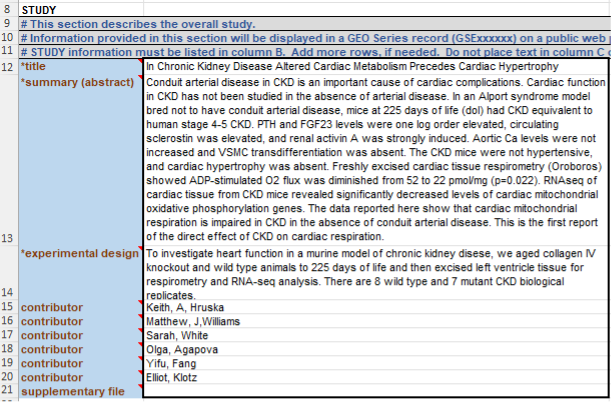
The first section of the Metadata tab, titled “STUDY”, contains overall information about the study, such as title, abstract, experimental design, contributors and supplementary files (Figure 1). The first three fields are mandatory, and the last two fields are optional, although contributor information is expected. This section should be filled out by the research team. Each contributor should be entered as a separate row, with the format “first name, initial, last name”. The “supplementary file” field is useful to add any additional files, one per row.
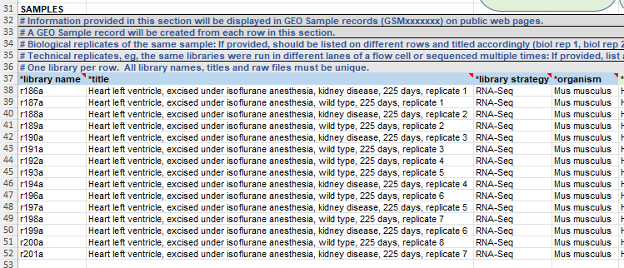
The second section of the Metadata tab, titled “SAMPLES”, provides a description of each GEO sample record. Biological replicates of the same sample should be listed on different rows and titled accordingly. Data submitters should collect some overall sample information, such as library name (mandatory), title (mandatory sample description), library strategy (mandatory), and organism (mandatory terms using the NCBI Taxonomy Database) (Figure 2). The “library strategy” column is using a controlled vocabulary, so submitters should choose terms from the given drop-down menu.
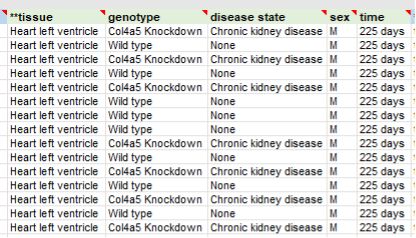
There are several optional columns for submitters to use, such as tissue, genotype, disease state, sex, and time. At least one column in the first three columns (“tissue”, “cell line” and “cell type”) should be filled out. Notice that submitters can add and remove optional columns. For example, during the GSE255815 submission, the “disease state”, “sex”, and “time” columns were added to the default template, and the “treatment” and “batch” columns were removed from the default template (Figure 3). This portion of the metadata should be filled out by the data submitters.
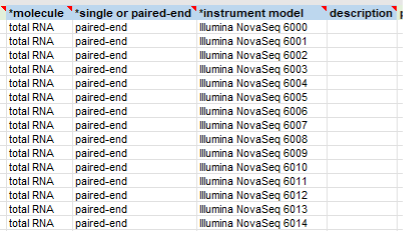
The following four columns in this section contain technique information (Figure 4). The “molecule” column is using a controlled vocabulary from a drop-down menu. For an RNA-seq dataset, the “molecule” column is normally “total RNA” or “polyA RNA”. For a CHIP-seq experiment, the “molecule” column should be “genomic DNA”. In the “single or paired-end” column, most NGS data are generated by paired-end sequencing. For the next column “instrument model”, data submitters should look at the report provided by the core facility. If no instrument information is available in the report, it is necessary to contact the core. Again, the “instrument model” column is using a controlled vocabulary from a drop-down menu. The last column “description” allows submitters to add extra information. As explained in the previous blog article, submitters can submit processed files at either the individual sample level or the whole study level. If submitting processed files at the whole study level, these files should be added to the “description” column. Since GSE255815 only contains processed data at the individual sample level, the “description” column is left blank.
The last part of this section contains columns for processed data files and raw files (Figure 5). For technical replicates, data submitters should list all raw files in the same row, adding more “raw file” columns as needed to accommodate all raw files. If there is more than one processed data file per sample, data submitters should enter each file into separate columns. At least one raw file is expected for a sample.

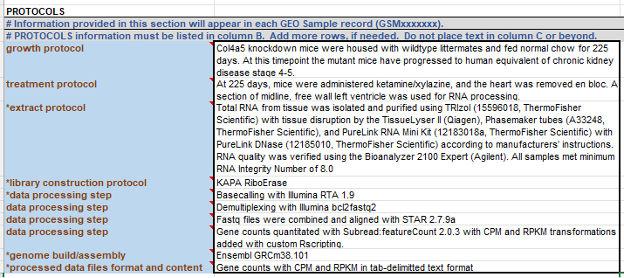
The next section of the metadata tab is “PROTOCOLS” (Figure 6). The “growth protocol” and “treatment protocol” fields are optional but normally provided by data submitters. In many cases, data submitters may not know the exact information about “extract protocol”, “library construction protocol”, “data processing step”, “genome build/assembly” and “processed data file format and content”. The best practice is to contact the core facility to make sure of the accuracy of these fields. Since it may take some time for the core facility to respond to any requests, it is not a good idea to wait until the last moment to submit data to GEO.
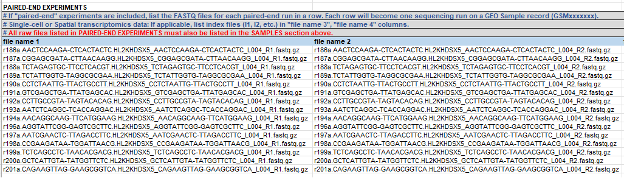
The last section of the metadata tab is “PAIRED-END EXPERIMENTS” (Figure 7). In the section, data submitters should make sure that the first read (R1) and second read (R2) files are properly paired. For scRNA-seq, scMulti-omics and spatial transcriptomics datasets, there may be more than two FASTQ files per run, and additional columns should be used.
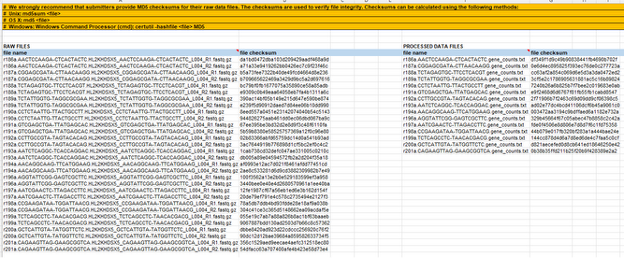
After filling out the “Metadata” tab, GEO expects (“strongly recommend”) data submitters to provide MD5 checksums for raw data files (Figure 8). Many data submitters provide checksums for processed data files as well. The GTAC core at WashU usually provides a checksum file for all raw data files, and a checksum file for all individual level processed data files. Please check my previous blog article if you need to locate them. If you want to submit checksums for study level processed data files, you can use the instructions at the top of the “MD5 Checksums” tab to generate checksums.
This concludes the metadata preparation guide for submitting RNA-seq data to GEO. If you need help submitting data to GEO, please email BeckDMS@wustl.edu or use this link to schedule a consultation meeting with our team.