
Research continues to generate more and more data, and large-scale data analyses can be complicated, computationally intensive and not suitable for personal computers. When faced with such a problem, what options do researchers have? Researchers can use High Performance Computing (HPC), a powerful technology which makes use of multiple computing processors that work in parallel to process highly intensive calculations and large-scale data analyses efficiently, securely and at extremely high speeds.
At WashU, several HPC clusters are available to meet the varied research computing needs of WashU researchers. These HPC clusters are managed by HPC and cyberinfrastructure professionals and provide more computing power and resources such as central processing unit (CPU) cores, graphics processing unit (GPU) cores, large amounts of random-access memory (RAM), high-speed networks, high performance storage systems, etc., than what is available on personal computers.
Almost everyone has a personal computer, maybe a laptop or desktop which consists of a single machine designed for general purpose day to day computing tasks such as creating and editing files, running programs, general data processing, browsing the internet, etc. A step up from personal computers are supercomputers which can consist of a large single-system computer that is more powerful and has more processors to execute more complex computational calculations, and process data at higher speeds than personal computers. At the top are HPC clusters which aggregate computing power to achieve significantly higher performance.
An HPC cluster can consist of multiple computers, or multiple supercomputers (compute nodes) that are set up to work together in a way that can be viewed as a single unit (HPC cluster). High-speed internet network connects the compute nodes, a batch job scheduler software and additional components to achieve high computing performance with capability of running complex computational tasks simultaneously on numerous compute nodes more efficiently and for a much shorter duration than individual personal computers. This powerful parallel computing approach provides more computing resources to solve complex computing problems and computationally intensive tasks on data that are too big and/or would take too long to process on a personal computer or supercomputer.
A variety of applications for large-scale data management and analyses can run on HPC clusters. The workflow on HPC clusters could include data transfer from elsewhere onto the HPC cluster or data mount (access) from a storage location that integrates with the HPC cluster. Then, generating a batch script or implementing container tools such as Docker or Apptainer to tell the HPC cluster how to run a given task, process data input and manage output. Users need a personal computer (either Linux or Mac or Windows) that has Unix command line interface and secure shell (ssh) protocol to securely connect to the login nodes on the HPC cluster (see figure below). Once connected to the hpc login node, a user can type commands on the command line prompt or use a web interface such as Open On Demand to submit tasks to the compute nodes for execution.
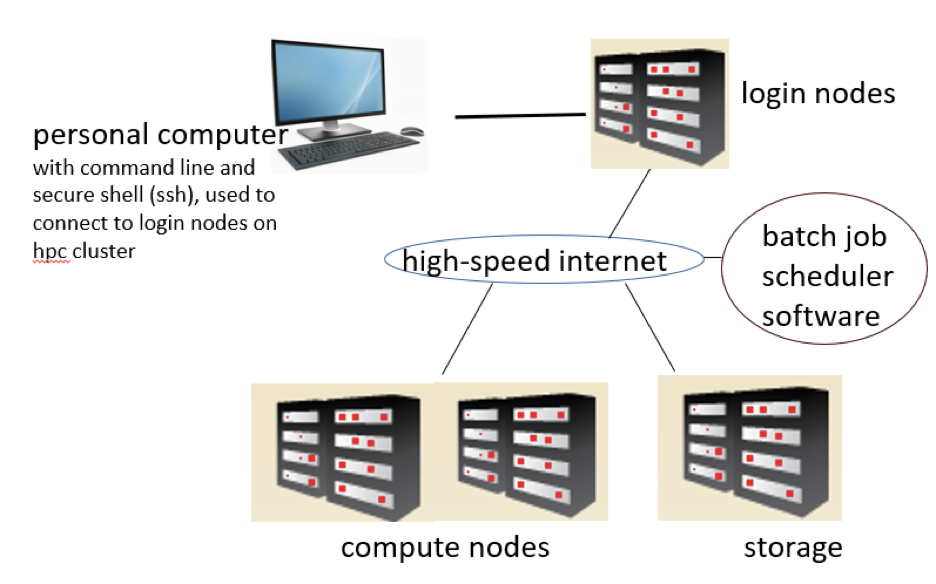
Why use an HPC cluster? Here are a few reasons why you may consider using an HPC cluster for your research computing needs:
- Speed up computing tasks: Does data analysis take too long to run on your personal computer? If so, your personal computer may not have enough computing resources to speed up the tasks, you may need additional computing power that an HPC cluster can provide.
- Automate computing tasks: Do you need to process or analyze a very large number of files or datasets using the same processing workflow? If so, it would be helpful to automate the computing tasks on an HPC cluster.
- When your data files are very large: Are you working with very big data files? If so, you would need more computing resources to process and analyze the data.
- When you need several rounds of testing: Do you need to create simulations that are complex and computationally intensive? Do you need to investigate and design a data processing workflow or pipeline for large-scale data analysis? If so, an HPC cluster is a great option for running several rounds of testing.
WashU researchers who need to solve complex computing problems and analyze very large data sets, find that HPC is an essential tool for their research. Researchers at WashU can access HPC services and technical support through Research Infrastructure Services (RIS) or through one of the departmental HPC facilities listed below. Access to departmental HPC facilities is restricted to only members of that department.
- Research Infrastructure Services (RIS) Scientific Compute Platform: is open to all researchers at WashU. Researchers can run large-scale, parallel computing tasks for a variety of data types and use cases. Learn more: https://ris.wustl.edu/systems/scientific-compute-platform/.
- Research Computing and Informatics Facility (RCIF) formerly called the Center for High Performance Computing (CHPC): RCIF serves researchers in the Mallinckrodt Institute of Radiology and provides HPC resources for large-scale human imaging data management, clinical imaging data for research purposes and related project data. Learn more: https://www.mir.wustl.edu/research/core-resources/research-computing-and-informatics-facility/.
- High Throughput Computing Facility CGS_SB (HTCF): provides HPC to researchers within the Center for Genome Sciences and Systems Biology. Learn more: https://htcf.github.io/docs/.
- Center for Regenerative Medicine Computing Resource provides HPC to members of the Center of Regenerative Medicine. learn more: https://regenerativemedicine.wustl.edu/cores/brc/computing-resource/
- The Engineering Research Compute Cluster (ENGR Cluster): provides HPC to researchers in McKelvey School of Engineering. Learn more: https://washu.atlassian.net/wiki/spaces/EIKB/pages/184582522/Research+Compute+Cl
uster
- Physics High Performance Computing Center: provides HPC to researchers in the Department of Physics. Learn more: https://research.washu.edu/core-facilities/physics-high-performance-computing-center/.
- Earth, Environmental, and Planetary Sciences high performance computing laboratory: provides HPC to researchers in the Department of Earth, Environmental, and Planetary Science. Learn more: https://eepshpcl.wustl.edu/.
Personal computers are easily accessible, however, HPC clusters are shared computing systems and are not available to everyone. Users need to learn to use them efficiently and fairly, and this requires some basic onboarding knowledge. Bernard Becker Medical Library has collaborated with RIS the pas few years to provide introductory compute workshops designed for those with no prior exposure to HPC and the Unix command line. The workshops introduce the Unix command line, how to connect to an HPC cluster and how to submit and run tasks on an HPC cluster. The trainings aim to demystify HPC to novices, provide terminology to ease communication between research computing facilitators and researchers, and motivate ongoing learning.
Are you interested in getting started with command line and HPC? If so, check out the following training resources:
- Introductory compute classes: – https://wustl.box.com/s/rg1nzoj1h47ihl5rf6st3x91gtp8mz25
- References and additional training resources: –
https://wustl.box.com/s/k3zkvk6w8jg3thh6rzcrhifq0s4t6fdr
Contact Maze Ndukum at ndukummaze@wustl.edu or askbecker@wustl.edu, if you have feedback to share and if you have additional information that you’d like to add to this blog.