
The NIH just announced the Preview of NIH Common Forms for Biographical Sketch and Current and Pending (Other) Support. Preview versions will be available within SciENcv on or before September 15.
The announcement also included recommendations for researchers to:
- Obtain an Open Researcher and Contributor Identifier (ORCID iD).
- Associate your ORCID iD account and eRA Commons account with SciENcv.
- Link your ORCID iD to your eRA Commons Personal Profile prior to previewing the forms.
Becker Library is offering a Zoom session on Mon. Oct. 13 at 11:00 AM that will provide attendees with more information about ORCID and includes direction on how to link your record to eRA Commons.
ORCID, which stands for Open Researcher and Contributor ID, is a name-independent person-identifier founded specifically to help solve the problem of name ambiguity in research and to enable transparent and trustworthy connections between researchers, their contributions, and their affiliations. An ORCID iD is a free, unique, persistent identifier (PID) for individuals to use as they engage in research activities. The ORCID iD is the 16-digit number that connects to an individual’s ORCID record.
Along with registering for an ORCID iD and then populating your ORCID record, you can also assign a delegate (trusted individual) to assist with managing your ORCID record.
- Your delegate can add to or edit information within your ORCID record.
- Your delegate can also make connections with external systems.
- Delegates can only be added or removed by you. No one at WashU can add delegates for you.
- Delegates cannot edit anything that requires you to enter your ORCID password, including adding email addresses, resetting your password, and deleting your account.
Your delegate does not need to be a fellow researcher but MUST have an ORCID iD.
Please see the screenshots below to see how to add a delegate to your account.
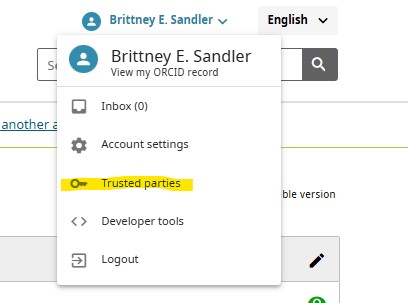
Sign into your ORCID account and click on your name in the upper righthand corner and select Trusted parties from the dropdown menu.
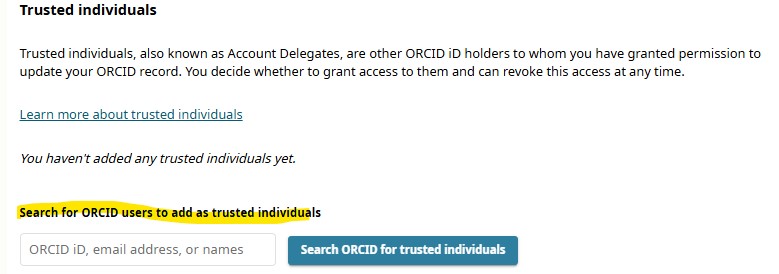
Scroll down to the Trusted Individuals section. In the search box, enter the ORCID iD, email address or name of the person you would like to add as a delegate. Click on the “Search ORCID for trusted individuals” button.
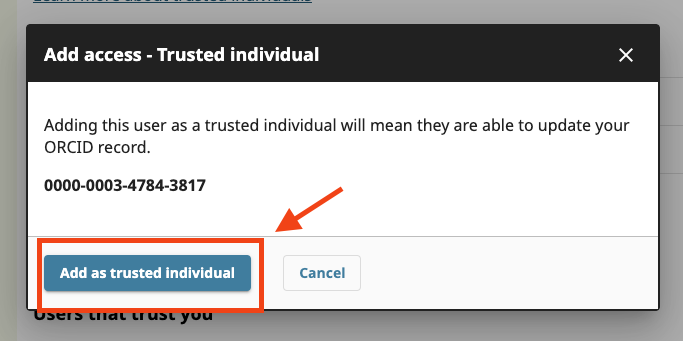
If you search by ORCID iD or email, a pop-up box will appear and ask you to “Add as a trusted individual”.
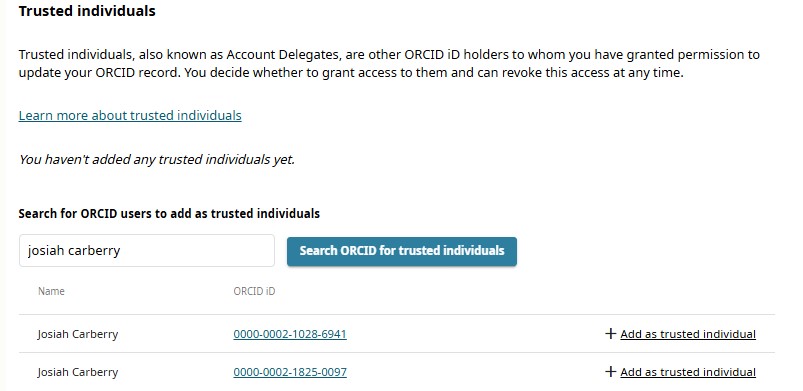
If you search by name, a list of matching ORCID records will be shown. If you need to check that you have the correct person, click on the user’s ORCID iD to be view their public ORCID record. Once you have identified the correct person, click on “Add as a trusted individual”.
The name and ORCID iD of the trusted individual will now appear in your Trusted Individuals section.
At any point, if you need to revoke access from a trusted individual, find their name in the Trusted Individuals section and click on the “Revoke Access” next to the name.
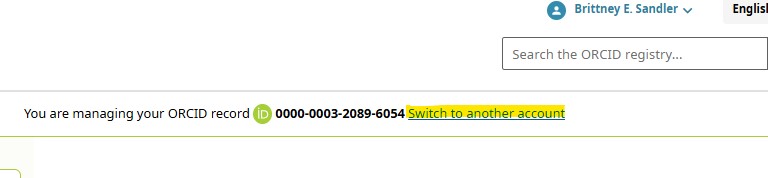
Your delegate should receive a notification in ORCID inbox that they have been added. Once they log into their own ORCID record, an additional option will appear at the top of the ORCID record allowing them to view their record or switch to another account. They can then choose the other account they would like to manage.
Resources:
Add a trusted individual to your account – ORCID
How can I help someone update their record as a trusted individual? – ORCID